DeadWatch · Use cases

Same watch. Different stakes.

An agency guarding a hundred client sites and a solo dev guarding one both need the same thing: to know it broke before someone else tells them. Here's what DeadWatch watches for four kinds of team — the problem each faces, what the watch covers, and the payoff.

01 · Agencies

A hundred client sites, one board — and reports that sell.

Problem
You manage dozens or hundreds of client sites. When one goes down, you want to know before the client calls — and you want each client to see their own status without seeing your roster or anyone else's.
Watches
Uptime, SSL/domain expiry, performance, VRT, DNS and SEO drift across every site. Role-based access and a client portal scope each client to their own sites. White-label the surface so it reads as yours.
Payoff
One board across the whole book of business, alerts routed per client to their own Slack, and — with Kestrel — audit-style reports you can turn into a new-business pitch.
client portalwhite-labelper-client routing role-based accessper-tenant isolation
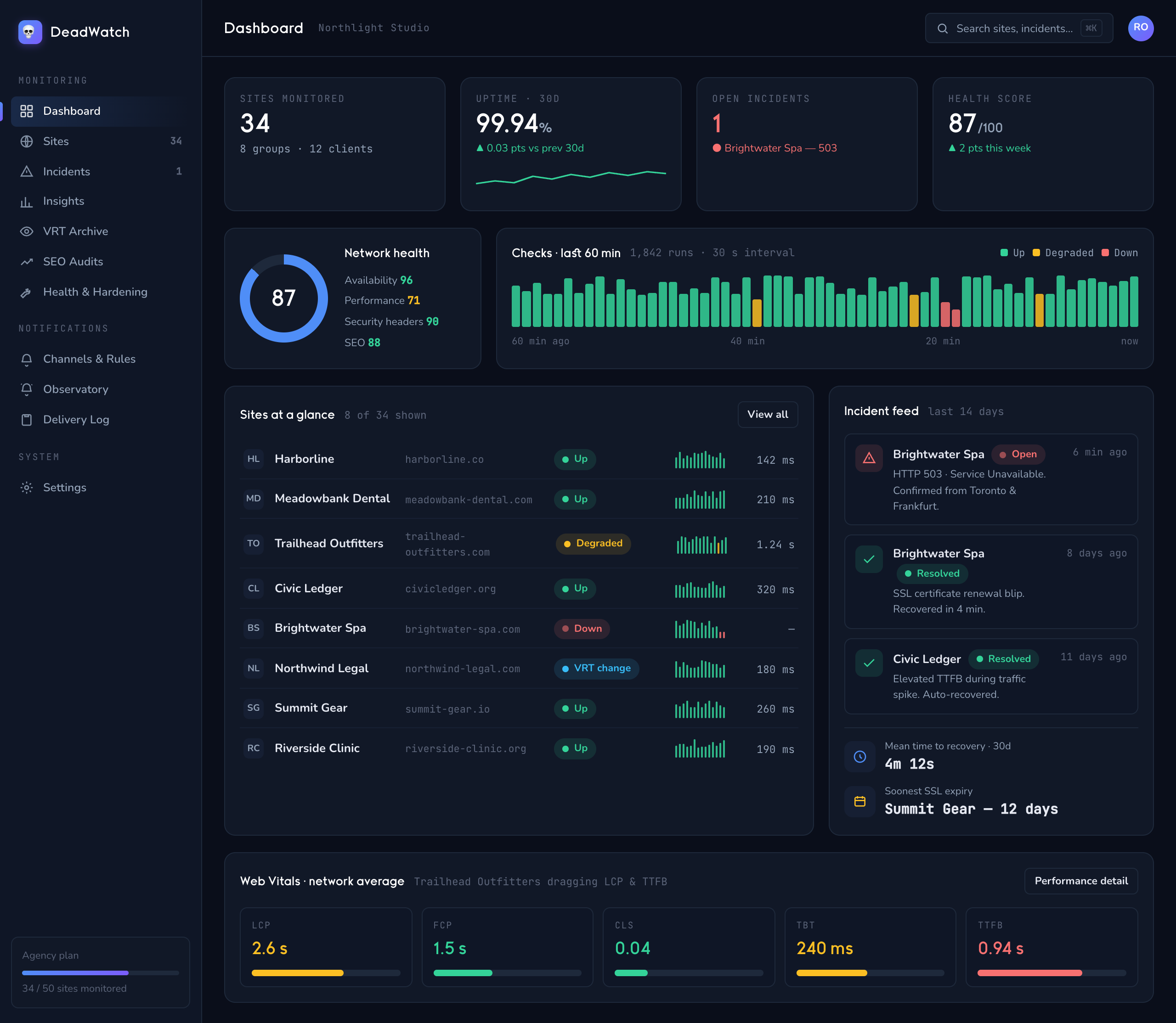
ExampleAn agency running 80 client sites can give each client a scoped login that shows only their uptime and health, route that client's outage alerts to the client's own channel, and send a monthly performance-and-SSL report generated from the same data.
/watch — fleet
Fleet dashboard showing many client sites and their health across one board
Every client site's health on one board — scoped per login for the client's own view.
02 · SaaS & ops teams

Uptime, performance and incidents — piped where you already work.

Problem
Your product needs to be up and fast, and when it isn't, the alert has to reach the on-call channel — not an inbox nobody's watching at 2 a.m. You also don't want a flapping endpoint paging the whole team.
Watches
Multi-region uptime with cross-region confirmation, Web Vitals with A–F grading and trend, plus SSL and header hardening. Incidents open only after confirmation and correlate so one outage is one event.
Payoff
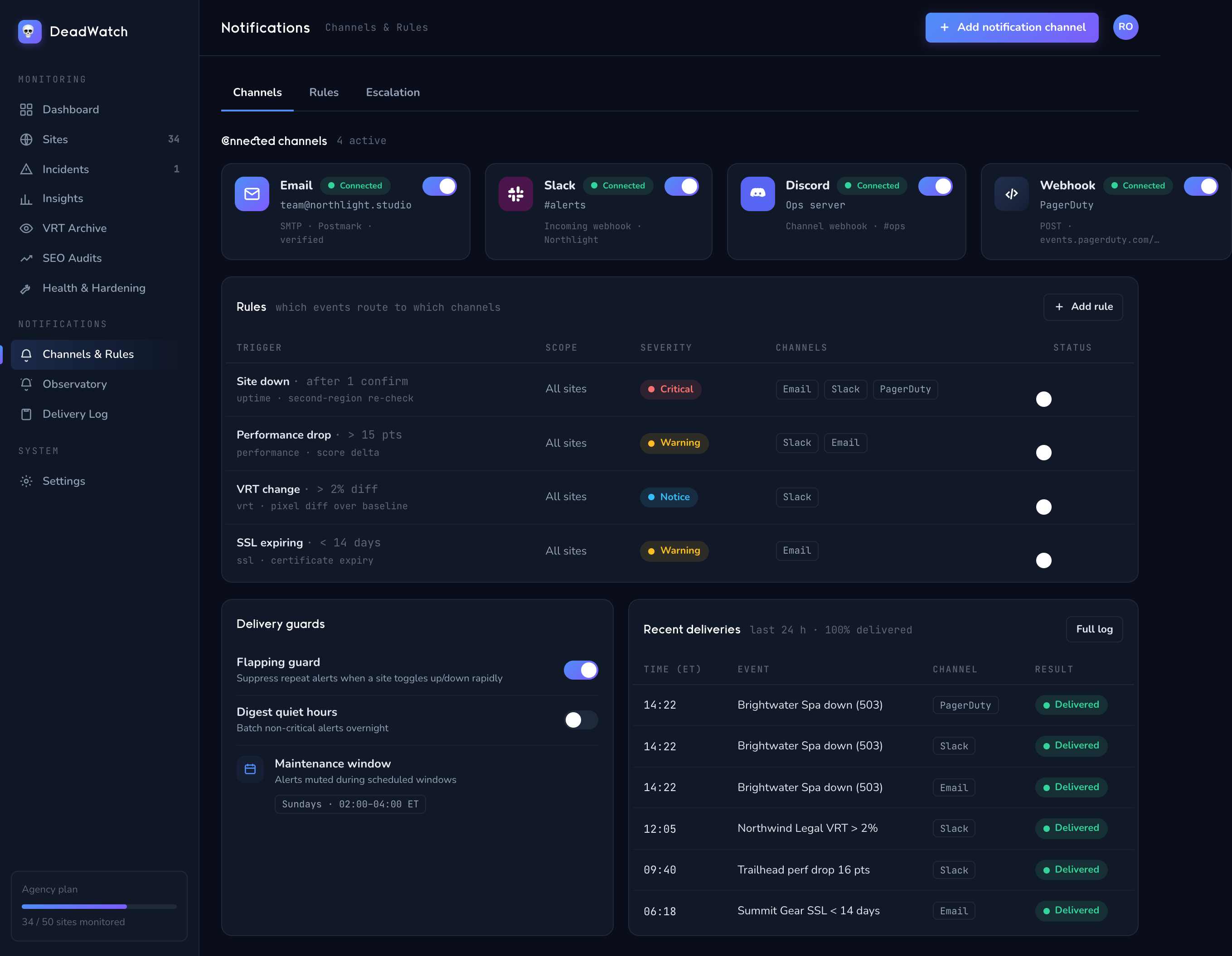
Down-after-confirm and threshold rules route to Slack, Discord, email or a generic webhook for your own tooling — with the flapping guard and maintenance windows keeping the noise off the channel.
Slack / webhook routingcross-region confirmflapping guard Web Vitalsmaintenance windows
ExampleAn ops team can send confirmed uptime.down events to their incident Slack, fire a generic webhook into their own automation, pause paging during a planned deploy with a maintenance window, and set a rule for a performance drop beyond 15 points.
/watch/notifications
Notification settings showing Email, Slack, Discord and webhook channels with routing rules
Route confirmed incidents to the channel your team already lives in.
03 · E-commerce

A broken checkout costs money the second it renders wrong.

Problem
Your store can return a 200 and still be broken — a theme update shifts the layout, the "Add to cart" button vanishes on mobile, or the certificate lapses and browsers throw a warning at the exact moment someone tries to pay.
Watches
Uptime plus visual regression (VRT) that screenshots each page and compares it to an approved baseline per breakpoint — so a checkout that breaks only on mobile is still caught. SSL/TLS expiry is flagged weeks ahead; content-drift and asset-change track what shifted.
Payoff
You see exactly what changed, pixel for pixel, before customers hit it — and get real lead time on an expiring certificate instead of a checkout that suddenly throws security warnings.
VRT visual regressionper-breakpoint diffSSL expiry lead time content-driftasset-change
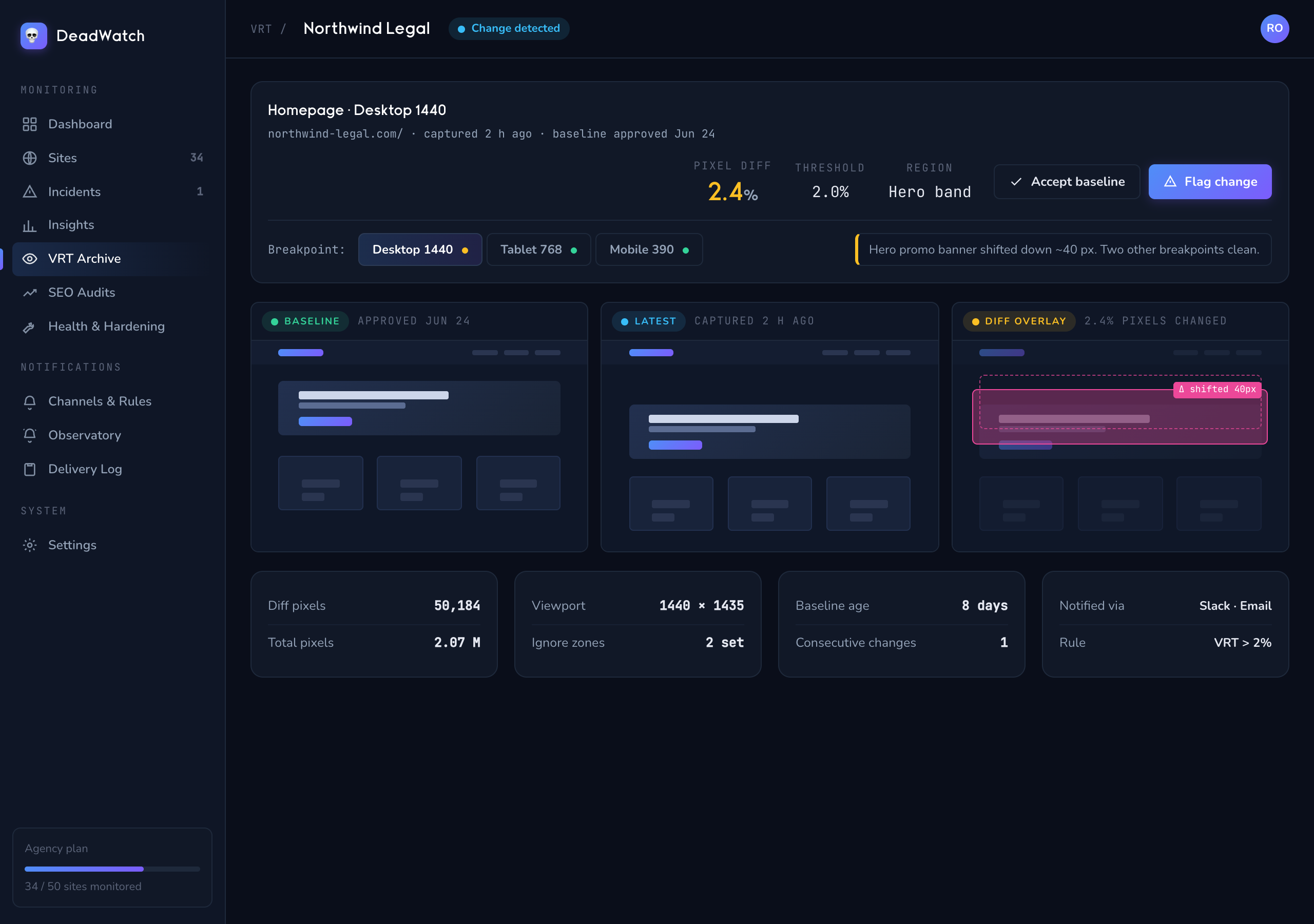
ExampleAn online store can baseline its product and checkout pages, then get flagged when a plugin update pushes the pay button below the fold on mobile — with a baseline / latest / diff overlay showing the exact shift — and get warned 30 days before the SSL certificate expires.
/watch/vrt
Visual regression comparison showing a pixel diff highlighted between baseline and latest capture
Baseline vs. latest, per breakpoint — the layout break caught before a customer sees it.
04 · Solo devs & small teams

Set-and-forget monitoring that doesn't need a war room.

Problem
You've got a handful of sites and no time to babysit them. You want to know if something's actually down, without a noisy tool that pages you over every transient blip or costs like an enterprise platform.
Watches
The same core watch — uptime with confirmation, SSL and domain expiry, performance and DNS — on an affordable Starter plan. Wire one channel, set your interval, and let it run.
Payoff
A real outage reaches you; a blip doesn't. No card to start, self-serve setup in minutes, and the same detection pipeline the bigger plans use — just sized for a smaller roster.
Starter $49/mo25 sitesconfirmed alerts only self-serve setupno card to start
ExampleA freelance developer can put their client sites and their own projects on the Starter plan, point alerts at a single Slack or email, and trust that a page means a confirmed problem — not a one-off timeout from a single check.
/watch/site
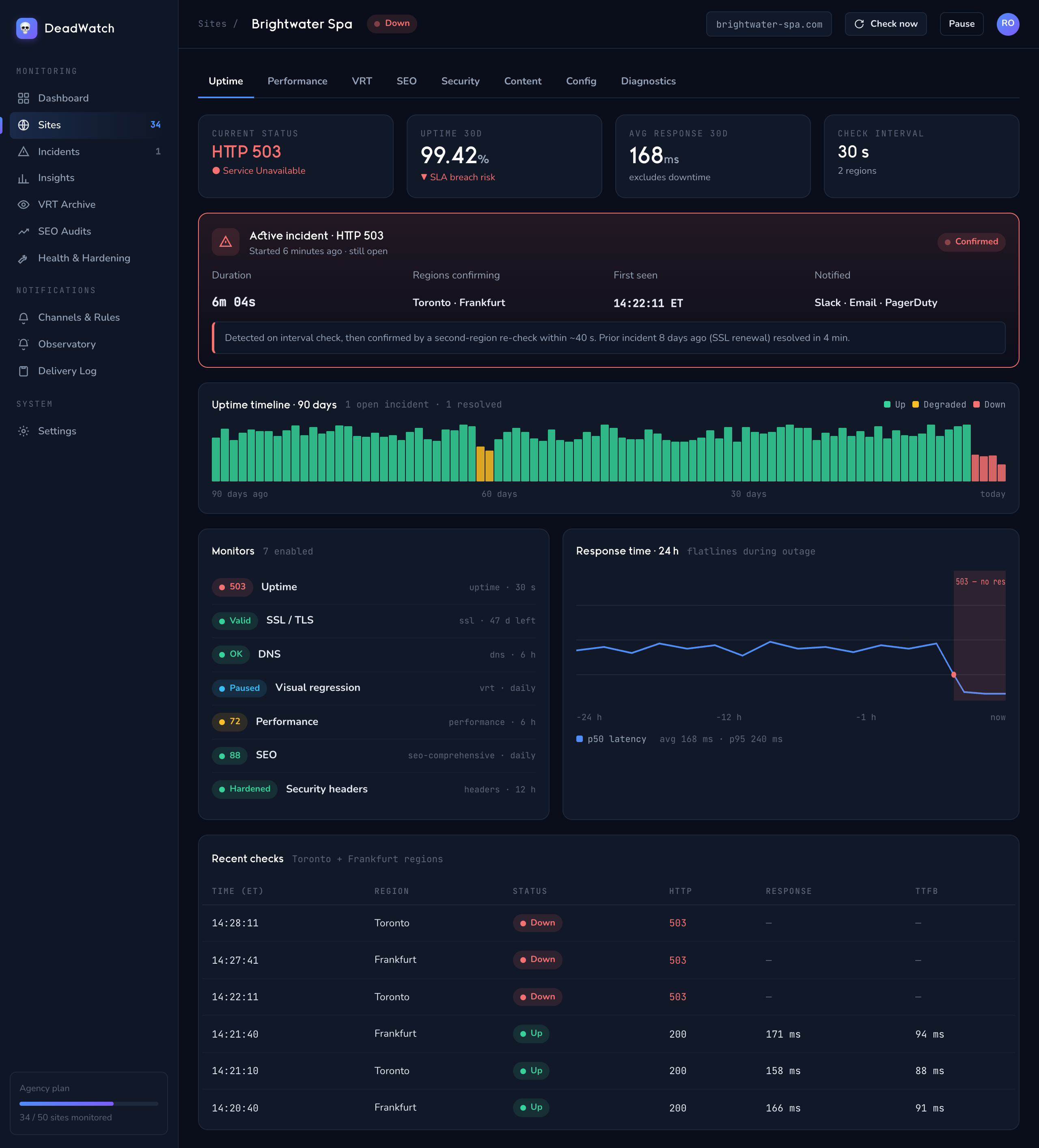
Site detail view showing uptime timeline and status for a single monitored site
One site, the full picture — uptime, incident history and status at a glance.
What every use case shares

One pipeline underneath all of them.

Whatever the roster size, the mechanism is the same: distributed checks, confirmed and correlated incidents, and durable notifications routed where you choose. The plan changes; the reliability doesn't.

Confirmed, not noisy

Cross-region confirmation and a flapping guard mean a page is a real problem — the same discipline on 5 sites or 500.

Routed your way

Email, Slack, Discord and generic webhook, matched by rule to sites or clients, with a durable delivery log behind every send.

Scoped for the audience

Role-based access and a client portal show each person only their sites — with per-tenant isolation keeping data separate.

Find your fit

Pick the plan that matches your roster.

Starter for a handful of sites, Pro and Business as the book grows, and the Agency plan when you're running the whole watch plus Kestrel outreach. See how it all fits together first, or jump to pricing.