Kestrel Diagnostics Reference
The canonical list of what the Kestrel scan reads on a prospect's website — every signal, how they roll into a score and grade, why some signals are honestly reported as "not checked" rather than penalized, and how a scan becomes a sold, delivered report.
Cold outreach is easy to ignore. A specific, true report about their site is not. Kestrel finds a prospect, scans their website against real checks, and hands you a branded diagnostic they can't argue with — one you can also sell. This document explains what the scan actually measures and how to read it. The guiding rule throughout: every finding is grounded in a real check. Nothing is invented.
How the scan is grounded
Kestrel doesn't guess. It drives a "Scout" probe against the live site — the same distributed check engine behind DeadWatch — and normalizes, scores, and reports on what comes back. There are three report surfaces built on that probe:
| Surface | Purpose | Character |
|---|---|---|
| Security / diagnostic audit | The saleable, findings-driven report | ~10 upstream collectors + in-repo probes, graded A–F |
Public self-check (/check) | A fact-only widget a prospect runs themselves | Faceted, no AI, honest normalization |
| SEO audit | On-page SEO scoring | Title/meta/canonical/schema/alt-text and more |
The signals — what the scan reads
The diagnostic audit runs roughly ten upstream collectors in parallel — ssl, headers, wordpress, email-deliverability, dns-comprehensive, whois, ports, asn, performance, crux — alongside a set of in-repo probes that read the page's own HTML and network behavior. The findings group as follows.
Security & TLS
| Group | What it reads |
|---|---|
| TLS / SSL | Certificate validity and expiry, weak protocol versions, CBC ciphers, HTTP/2 support. States surface as healthy, expiring soon, invalid, or unverifiable. |
| Security headers | CSP (missing / unsafe-inline), HSTS (missing / preloaded / preload-pending / not preloaded), X-Frame-Options, X-Content-Type-Options, Referrer-Policy, Permissions-Policy. |
| Disclosure | X-Powered-By and server-version leakage. |
| Cookies | Missing Secure, HttpOnly, or SameSite flags. |
| Network / surface | Exposed ports, missing DNS CAA record, single-nameserver-provider risk, missing IPv6, subdomain enumeration (via Certificate Transparency logs), domain-age trust. |
Email deliverability
Whether the domain can send trustworthy mail — a signal most prospects have never had checked. Reads SPF (missing, lookup overflow, dangerous/neutral/softfail all), DKIM (missing, weak key, deprecated hash), DMARC (missing, monitor-only, partial enforcement, no reporting, no subdomain policy), plus BIMI, MTA-STS, TLS-RPT, and the MX provider.
SEO
The SEO audit scores the on-page fundamentals from the probe: title, meta description, H1, canonical, Open Graph and Twitter cards, lang, viewport, robots, sitemap, schema (JSON-LD), alt-text coverage, and TTFB.
Speed & Web Vitals
Speed is measured with an explicit fidelity order — real-user data beats lab data beats DOM proxies — and the scan only counts the sources that are actually available (see The fidelity principle below).
| Source | What it is | Availability |
|---|---|---|
| CrUX | Real-user field data (Chrome UX Report) — LCP, CLS, INP at p75 | When Google has field data for the site |
| PSI | PageSpeed Insights lab scores (mobile / desktop) | When configured |
| Lighthouse | Lab speed and an accessibility score | When configured |
| DOM proxies | Always-on floor — DOM node count, render-blocking assets, third-party domain count, image dimensions / srcset / lazy-loading, modern image formats | Always |
CrUX findings distinguish poor from needs-improvement per metric, and can flag lab-vs-real-user divergence. The scan also flags page-weight and request-count problems from the DOM.
Tech stack
The scan fingerprints the technologies the site runs against a database of ~157 vendor signatures — analytics, chat, heatmap/replay, ad pixels, booking, CRM, e-commerce, marketing automation, payments, and A/B testing. It also detects the platform (WordPress, Wix, Squarespace, GoDaddy, Weebly, and others), guarding against WordPress plugins (Yoast, Site Kit, Elementor) being mistaken for the CMS itself.
WordPress specifics. When WordPress is detected, the upstream check returns version, detection confidence, a hardening grade and score (0–100), CDN and WAF detection, and flags high plugin counts or open plugin enumeration.
Web standards & client-side assets
Compression (gzip / Brotli), HTTP/3, legacy vs modern image formats, and outdated client-side JavaScript libraries matched against known-CVE fingerprints.
Compliance
Cookie-consent banner presence (cross-checked against the actual Set-Cookie count so a claimed banner that doesn't fire is caught), privacy-policy link, terms link, and accessibility-statement presence.
Conversion & marketing signals
The signals that tell a prospect their site isn't selling: number of <form> elements, above-the-fold CTA buttons, trust badges, social-profile links, and contact affordances (tel:, mailto:, a physical address). Plus marketing-tech gaps — no chat widget, marketing pixels present but no CRM.
File exposure (with soft-404 control)
The scan probes for sensitive files that shouldn't be public — .env variants, wp-config.php backups, .git/.svn/.hg metadata, database dumps, source maps, phpMyAdmin, Adminer, the WordPress installer, xmlrpc.php. See the next section for why this is done carefully.
The fidelity principle: "not checked" ≠ a penalty
This is the core of why an Kestrel report is trustworthy, and it runs through the whole scan.
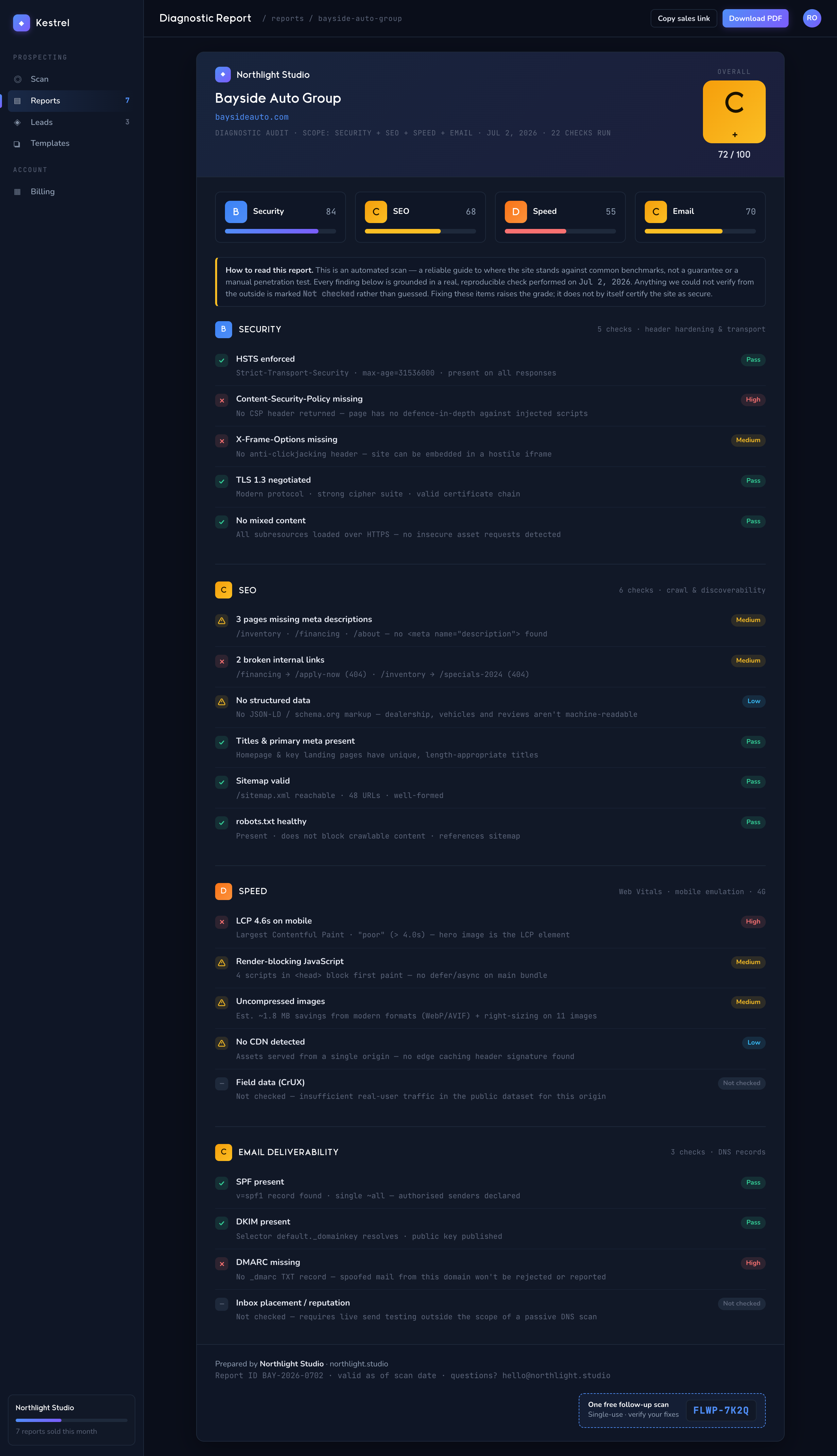
A signal that couldn't be checked never lowers the score. If CrUX has no field data for the site, or PSI/Lighthouse isn't configured, that source simply drops out of the weighted average — it is reported as "not checked," neutral, rather than counted as a failure. A DOM-only site lands on exactly its DOM score, with no phantom penalty for the data Google didn't have.
The same discipline governs individual signals: a signal read as unknown (never inspected) is distinct from one read as absent (checked, and not present). Only the explicit "checked and absent" case is marked down. When a whole dependency is unavailable, the scan emits an info-severity finding (zero score impact) that says so plainly — e.g. "Real-user metrics (CrUX) check unavailable" — rather than silently implying the check passed or failed.
Soft-404 control applies the same honesty to file exposure. Before trusting any HTTP 200 as a real exposed file, the scan fires two control requests to guaranteed-nonexistent random paths. If either control returns 200, the host is a catch-all that answers everything with a page — so all 200-based findings are suppressed and the file-exposure result is flagged inconclusive. Real probes are further confirmed by comparing response body length against that control baseline, so a themed "404" page dressed as a 200 doesn't produce a false hit. Admin tools that answer with 401/403 are reported as protected, not exposed.
The result: a report that says "we checked X and here's what we found," never "we're penalizing you for something we couldn't see."
Scoring & grades
The diagnostic audit (A–F)
Findings carry a severity; the score is 100 minus the summed penalty, clamped to 0–100.
| Severity | Penalty | Grade | Score | |
|---|---|---|---|---|
| Critical | 25 | A | ≥ 90 | |
| High | 15 | B | ≥ 80 | |
| Medium | 5 | C | ≥ 70 | |
| Low | 2 | D | ≥ 60 | |
| Info | 0 | F | < 60 |
Each report also records the finding count, critical count, and high count, and computes a delta versus the previous scan for the same site — the score change and whether the grade moved. Findings are further tagged by phase: urgent, hardening, or baseline, so the report reads as a prioritized worklist, not a flat dump.
The public self-check (facets)
The /check widget scores per facet — security, speed, seo, mobile, content, trust, tech — each starting at 100 and subtracting per issue, then blends them into an overall with speed and SEO weighted most heavily. The overall lands in a bucket: good (≥ 80), warn (≥ 50), or bad. It includes a "rented presence" guard — a business whose only web presence is, say, a Facebook page is graded honestly rather than handed a falsely high score.
Prospect lead scoring
Separately from the report grade, discovered prospects are scored for outreach priority. A weighted model ranks the signals that say a business needs help (an outdated platform, no SSL, a broken form, and so on) into Tier 1 / Tier 2 / Tier 3 priority, and attaches a suggested price range and outreach method per niche. Stale prospect signals are reconciled against a fresh probe before scoring so the tier reflects the site as it is now.
The honest-scan disclaimer
Every report carries a plain-language disclaimer — it's what makes the report the kind a prospect actually trusts:
Short: "Automated diagnostics are a guide, not a guarantee — verify critical findings before acting."
Full: "This automated diagnostic is a guide to help you reach recognized best-practice benchmarks. Automated checks can't catch everything and aren't a substitute for a manual expert review — verify critical findings before acting on them."
It renders into every report footer and on the self-check page. The report is framed as a guide toward recognized best-practice benchmarks, not a verdict — which sets honest expectations and protects the agency at the same time.
The report, the sale, and the coupon
The report
Reports render as branded HTML and export to PDF (via headless Chromium). The saleable audits come in tiers — the security audit as summary or detailed, the SEO audit as lite, detailed, or walkthrough. The public prospect widget shows a watermarked free PDF; unlocking yields the clean, un-watermarked version. The lead-generation side also exports prospect lists as Excel (.xlsx), outreach email templates as Word (.docx), and CRM data as CSV, gated by the account's export entitlement.
The money path
Checkout runs on Stripe, under your account, with two flows:
- Audit checkout — sells the SEO, security, or bundle report at per-tenant pricing. The buyer never creates an account; the report is delivered by email attachment. Stripe Connect is supported so revenue routes to you.
- Public unlock — the prospect-facing widget offers a one-click unlock of the clean report.
A Stripe webhook confirms checkout.session.completed (and handles refunds), which kicks off delivery.
Delivery
A delivery worker watches for paid purchases, renders the branded report, converts it to PDF, stores it, issues a time-limited signed download link, and emails the PDF as an attachment (with the signed URL as a backup). It flips the purchase to delivered on success, retries with backoff on failure, and supports a manual resend. Delivered PDFs are cleaned up automatically after they age out.
The follow-up coupon
On a genuine paid purchase, Kestrel mints a single-use, 30-day, 100%-off coupon (prefixed FLWP-) good for one free re-audit of the same URL — the hook that brings a buyer back for the re-scan after they've made fixes. It's single-use twice over: Stripe caps redemptions at one, and a coupon record ties it to that specific URL. Free or coupon-comped scans never mint another coupon — no free-to-free chains.
Reading an Kestrel report — quick orientation
- The grade is a snapshot: 100 minus real, severity-weighted findings. A "C" means specific, named issues, each grounded in a check.
- "Not checked" is honest, not a gap in the product — it means the scan refused to score something it couldn't verify.
- Phases (urgent → hardening → baseline) tell the prospect what to fix first.
- The delta against the last scan is the re-audit's whole story — proof the fixes moved the number.
- The disclaimer is the point, not fine print: it's why the report is credible.