Speed, SEO & SSL
Read Web Vitals, SEO signals (robots / sitemap / canonical), DNS, and SSL/expiry — and know what to do when one drops.
These are the quiet failures: a slow page that costs rankings, a canonical that drifts, a certificate that's about to expire. DeadWatch reads them all and shows them on each site's tabs and in the Watch Tower on the site Overview.
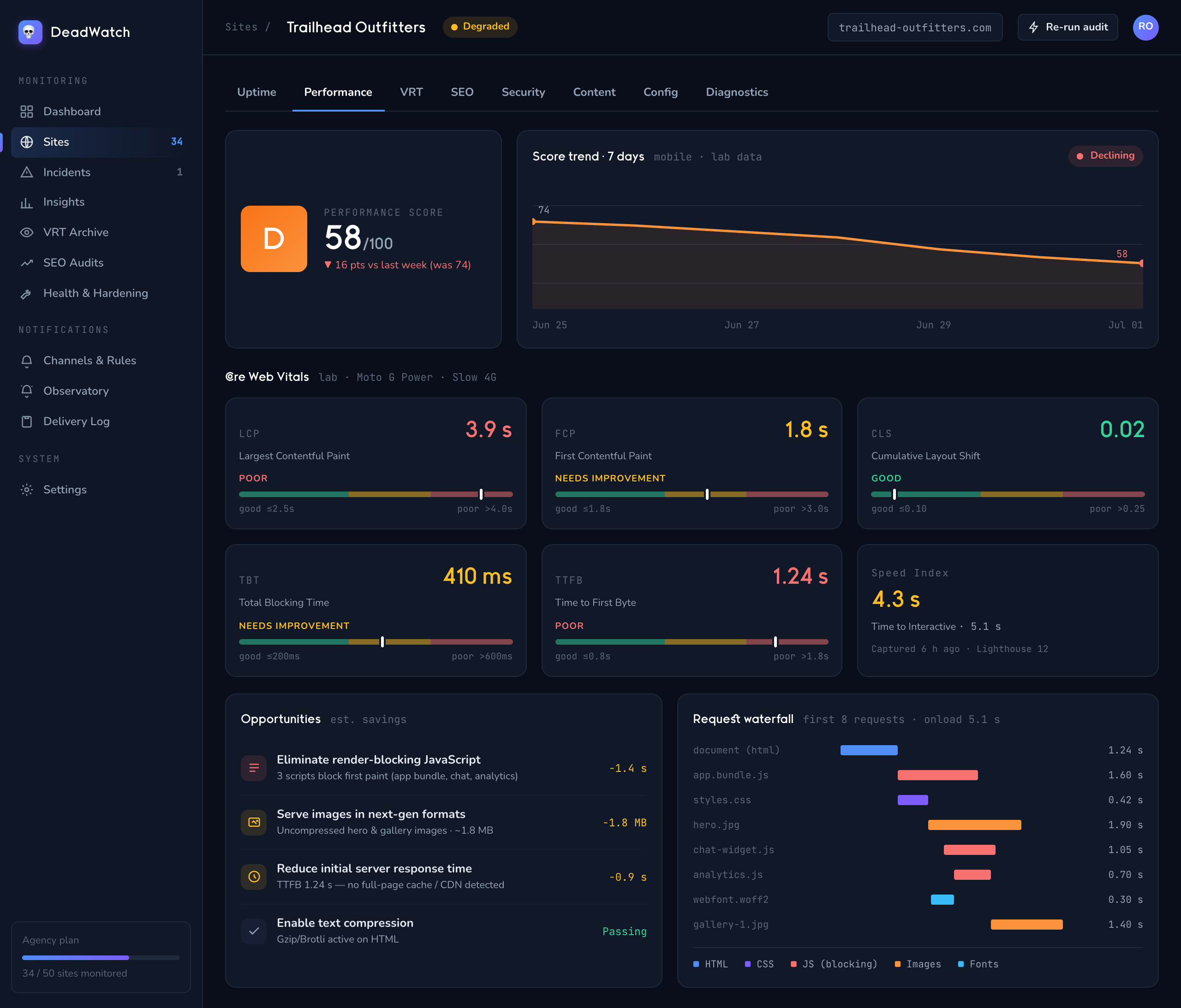
Web Vitals (speed)
- Open a site and go to the Performance tab.
- Read the metrics — each is graded good / needs-improvement / poor:
- LCP — Largest Contentful Paint (good ≤2.5s)
- FCP — First Contentful Paint (good ≤1.8s)
- CLS — Cumulative Layout Shift (good ≤0.1)
- TBT — Total Blocking Time (good ≤200ms)
- TTFB — Time to First Byte (good ≤800ms)
- INP — Interaction to Next Paint, plus Speed Index and Load
- Use Metric Trends and Performance Trend to see whether a regression is new, and Largest Resources to find what's slowing the page.
The site Overview shows the headline Core Web Vitals chips (LCP, FCP, CLS, TBT, TTFB, Load) at a glance.
Act on it: a jump in LCP or TBT usually points to a heavy new asset or script — check Largest Resources and the navigation-timing breakdown (DNS / TCP / TLS / Response / DOM), then route a perf.degraded alert so you catch the next one early.
SEO signals
- Open a site and go to the SEO tab.
- Review the baselines:
- Robots.txt — present, and whether it Blocks All
- Sitemap — found, with URL count
- Canonical Tags — Set or Missing
- Structured Data (schema)
- The SEO Baselines card in the Watch Tower mirrors these for a quick read.
Act on it: a canonical that flips to Missing or a robots.txt that suddenly Blocks All is exactly the kind of silent change that tanks search traffic with no error page. Alert on content.drifted / SEO events and fix before rankings move.
DNS
- On the site Overview, open the Domain & DNS card in the Watch Tower (or the Security tab for full records).
- Read the record counts and posture: A (IPv4), AAAA (IPv6), MX (mail), NS, TXT, and email auth — SPF (Present / Missing) and DMARC (Present / Missing).
Act on it: unexpected record changes can signal a migration — or a takeover. Cross-check with the Triage patterns and integrity events.
SSL/TLS & expiry
- Open the SSL / TLS card in the Watch Tower (Overview).
- Read Status, CN, Issuer, Expires, Protocol, Cipher, and the Grade.
- The Sites board shows a *🔒 SSL Nd badge as expiry approaches, and 🌍 Domain Nd* for domain expiry.
Act on it: wire an ssl.expiring (and domain.expiring) rule so you get days of warning — never a surprise "your site says not secure" call from a client.
You'll know it worked when… every card in the Watch Tower reads green and your alert rules cover expiry, perf, and SEO drift.
Next: Security monitoring → — headers, exposed files, and hijacking signals.